Putting someone in a group or giving them an app used to mean opening that group or app, finding the person in the picker, and saving. Onboarding a new hire into six groups meant six round trips. Now the list screens do it directly.
On Manage Users, every row’s menu has Add to group and Assign to app, and the same actions appear in the bulk menu when you select several people. On Groups, a row’s menu offers Add users. On Apps, it offers Assign users and Assign groups. Each opens a picker that shows what’s already there, greyed out and labelled, so you can see the current state instead of guessing at it.
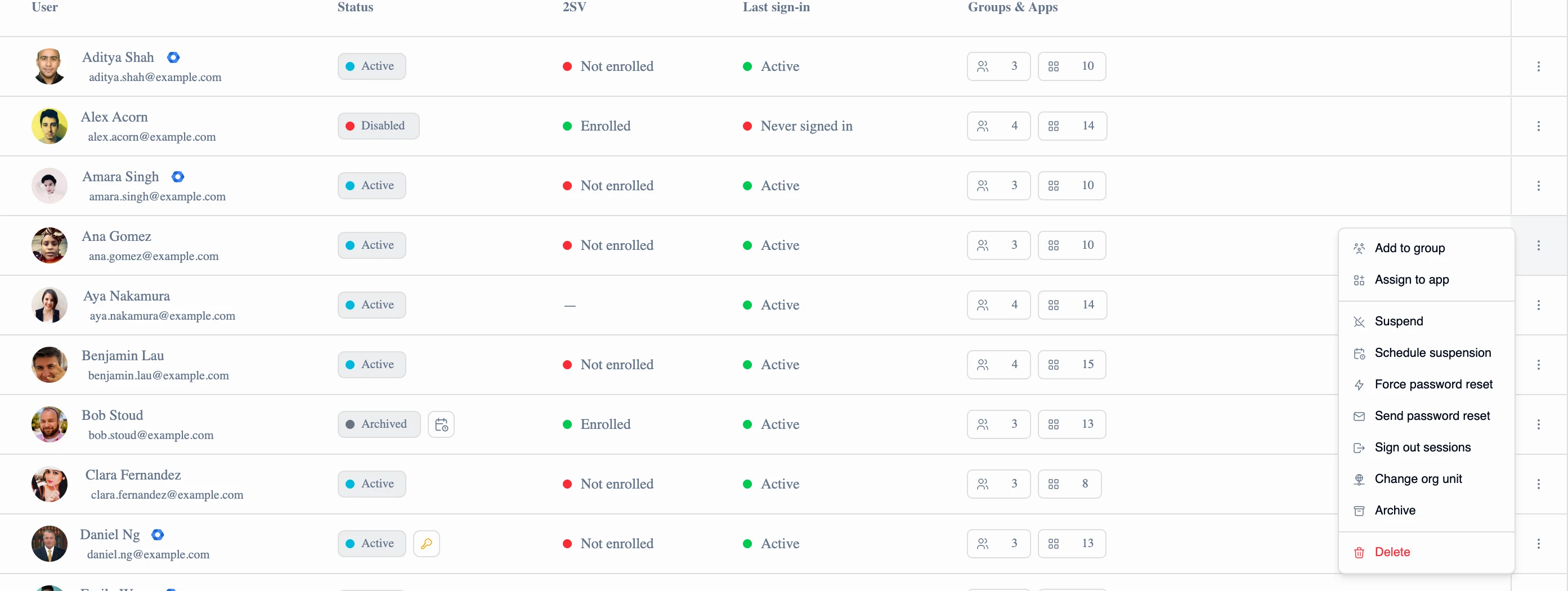
- Additive only. These actions add; they never remove. Taking someone out still happens on the group or app detail screen, where the full membership is in front of you
- Several targets at once. Add three users to two groups in one go. A message popup confirms what happened, and if any target can’t be updated it tells you which one
- Directory-aware. In workspaces running both JumpCloud and Google, each directory’s submenu carries its own Add to group, filtered to that directory’s groups
- No accidental duplicates. Existing members and assignments stay visible in the picker but can’t be picked twice